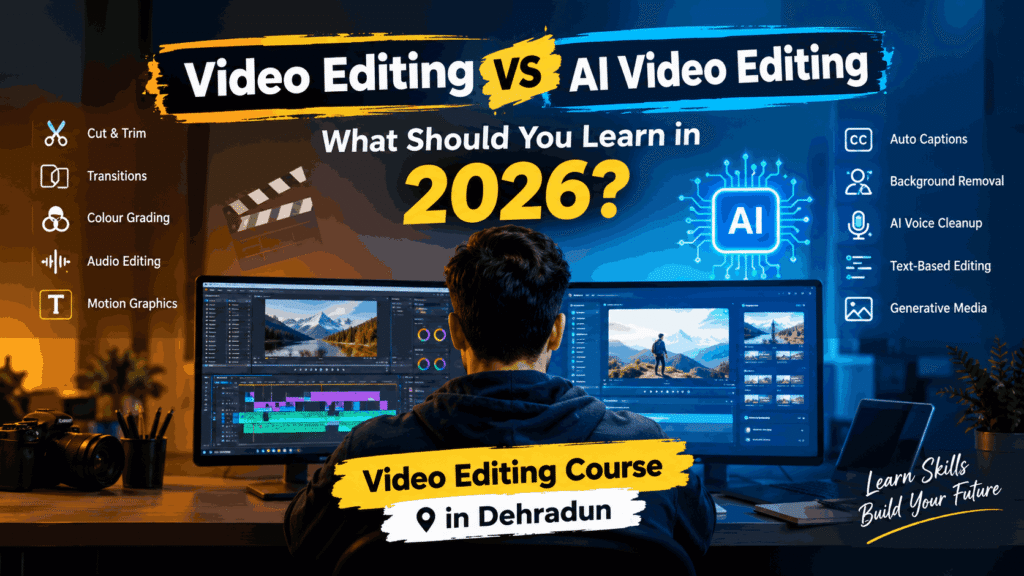
Choosing a Video Editing Course in Dehradun in 2026 is not only about learning Premiere Pro, cutting clips, and adding transitions. AI has altered the way videos are created, edited, captioned, enhanced, and even generated.
That creates a practical question for beginners and professional editors: Should you learn traditional video editing, AI video editing, or both?
The short answer is both. AI is becoming a powerful part of the editing workflow, but it does not replace the creative and technical fundamentals that make a video actually work. If you want to build a career, freelance, edit YouTube videos, create Reels, or work with businesses, understanding editing fundamentals and knowing how to use AI together can give you a much stronger skill set.
Let us compare the two approaches and look at what you should actually learn in 2026.
What Is Traditional Video Editing?
Traditional video editing involves taking raw footage and turning it into a finished video using editing software.
An editor decides what stays, what gets removed, how scenes are arranged, how the story flows, and how sound and visuals work together.
A typical workflow may include:
- Importing and organizing footage
- Cutting and trimming clips
- Arranging a timeline
- Adding transitions where appropriate
- Colour correction and colour grading
- Audio editing and sound design
- Adding titles, graphics and subtitles
- Using effects and motion graphics
- Exporting videos for different platforms
Popular professional software includes Adobe Premiere Pro, DaVinci Resolve and After Effects, depending on the type of work.
The important point is that traditional editing teaches you why an edit works, rather than simply showing you how to automate it.
For example, removing three seconds from a talking-head video is easy. Knowing which three seconds should be removed to improve pacing is an editorial decision.
That judgement comes from practice.
What Is AI Video Editing?
AI Video Editing uses artificial intelligence to automate or speed up parts of the video production process.
Instead of manually performing every repetitive task, AI-powered features can help with things such as:
- Automatic transcription
- Caption generation
- Silence and filler-word removal
- Background removal
- Object or subject detection
- Audio enhancement
- Voice cleanup
- Scene detection
- Automatic reframing
- Generative video and image creation
- Text-based editing
- Creating clips from longer videos
AI can save significant time, particularly when working with large amounts of footage or creating content regularly.
Imagine recording a 30-minute interview. Traditionally, an editor might spend considerable time reviewing the footage, creating a transcript, finding useful sections and building a rough cut.
With AI-assisted tools, transcription and content discovery can happen much faster.
But there is an important limitation: speed is not the same as creative judgement.
AI can identify a pause. It cannot always understand whether that pause creates tension, emotion or emphasis.
Video Editing vs AI Video Editing: The Real Difference
The biggest difference is not that one uses software and the other uses AI.
The real difference is who makes the creative decisions and how much of the technical process is automated.
| Area | Traditional Video Editing | AI Video Editing |
| Cutting footage Captions Silence removal Audio cleanup Storytelling Visual effects Content generation Learning fundamentals Speed Creative control | Mostly manual Manual or automated Manual Manual adjustments Editor-driven Mostly manual Limited Strong Moderate Very high | Mostly manual Manual or automated Manual Manual adjustments Editor-driven Mostly manual Limited Strong Moderate Very high |
This is why the debate should not really be video editing versus AI video editing.
For someone starting a career, the better question is:
How can I learn video editing fundamentals and use AI to become faster and more productive?
AI may automate individual tasks, but professional editing involves much more than pressing an AI button.
A good editor needs to understand:
Storytelling and pacing
A video needs a reason for the viewer to keep watching. You need to understand when to make a cut, when to hold a shot, how to build anticipation and how to remove unnecessary information.
Visual continuity
Different shots need to work together.
An editor should understand framing, camera angles, movement, screen direction and continuity rather than blindly accepting an automated edit.
Audio
Poor audio can make an otherwise attractive video feel amateur.
Editors need to understand dialogue levels, background noise, music, sound effects, ambience and basic mixing.
Colour
Colour correction is about making footage consistent. The next step, colour grading, goes further by creating a particular visual mood.
AI can assist with parts of this process, but knowing what looks right still matters.
Motion and graphics
Titles, lower thirds, animated text, logos and visual effects are common in commercial and social media content.
Understanding motion graphics gives an editor more control over the final result.
These fundamentals remain useful regardless of which AI tools become popular next year.
Why AI Video Editing Is Worth Learning
Ignoring AI completely would also be a mistake.
AI can make an experienced editor significantly more efficient.
Consider a social media editor producing several short-form videos every week.
Instead of manually creating every caption, searching through an entire interview for useful moments, removing every pause and cleaning every piece of dialogue, AI can assist with much of the repetitive work.
This leaves more time for:
- Creative decisions
- Story development
- Visual design
- Client revisions
- Better pacing
- Experimenting with different formats
AI is particularly useful for creators who need to produce content consistently.
For YouTubers, Instagram creators, agencies and freelancers, productivity can be just as important as technical skill.
So, What Should You Learn First?
If you are a complete beginner, do not start by learning dozens of AI tools.
Start with editing fundamentals.
A sensible learning path looks like this:
Step 1: Learn the fundamentals
Understand cuts, timelines, frame rates, resolutions, aspect ratios, codecs and export settings.
You do not need to become a technical expert immediately, but you should know what these concepts mean.
Step 2: Learn professional editing software
Choose one main editing platform and become comfortable with it.
For example, you could learn Premiere Pro or DaVinci Resolve before expanding into additional software.
The goal is not to collect software names. The goal is to become capable of completing real projects.
Step 3: Practice different types of content
Do not edit the same type of video repeatedly.
- YouTube videos
- Instagram Reels
- Product videos
- Interviews
- Promotional videos
- Educational videos
- Short advertisements
- Event highlights
Different formats teach different editing decisions.
Step 4: Add AI to your workflow
Once you understand the fundamentals, start exploring AI tools for transcription, captions, audio enhancement, background removal, content repurposing and other repetitive tasks.
This approach helps you understand when AI is useful and when manual editing is better
Step 5: Build a portfolio
A certificate alone does not demonstrate editing ability.
Create a portfolio showing different projects and explain what you did in each one.
For example:
Edited a 10-minute YouTube video with pacing improvements, colour correction, audio cleanup, animated titles and short-form clips for social media.
That tells a potential client much more than simply saying “I completed a video editing course.”
Who Should Consider a Video Editing Course in Dehradun?
A structured Video Editing Course in Dehradun can be useful if you are starting from zero and want guidance rather than trying to learn everything randomly from online tutorials.
It can be particularly relevant for:
- College students
- Beginners looking for a practical digital skill
- Aspiring freelance video editors
- YouTubers and content creators
- Social media managers
- Small business owners
- People interested in advertising and media production
- Existing designers who want to add video to their skill set
For students in Dehradun, local training can also make it easier to attend practical classes, ask questions directly and work through projects with an instructor.
When comparing Video Editing Classes in Dehradun, look beyond the course title.
Check whether the curriculum includes practical editing, real projects, software training, audio, colour, motion graphics and modern AI-assisted workflows.
What Should Video Editing Classes Include?
A good Professional Video Editing Course should not be built around only one software package.
Ideally, the curriculum should cover the complete workflow.
Core editing
- Timeline editing
- Cutting and trimming
- Transitions
- Multicam editing
- Speed controls
- Project organization
Audio
- Dialogue editing
- Noise reduction
- Music
- Sound effects
- Basic audio mixing
Colour
- Colour correction
- Exposure and white balance
- Skin tones
- Creative grading
Motion graphics
- Animated text
- Titles
- Lower thirds
- Basic visual effects
- Logo animation
Social media editing
- Vertical video
- Reels and Shorts
- Hooks
- Captions
- Fast-paced editing
- Platform-specific exports
AI-assisted workflows
- AI transcription
- Automatic captions
- Audio enhancement
- Generative assets
- Background removal
- AI-assisted editing
- Content repurposing
This combination makes a course more relevant to the way modern content is actually produced.
Is an AI Video Editing Better?
Not necessarily.
An AI Video Editing Course in Dehradun can be useful if it teaches practical AI applications alongside editing fundamentals.
However, a course that simply introduces a long list of AI tools without teaching editing principles may leave you dependent on whichever tool you are currently using.
AI software changes quickly.
The fundamentals of storytelling, composition, pacing, audio and visual communication are much more durable.
Think of AI as a power tool, not the entire profession.
A person who knows how to use a power tool but does not understand the work may produce something quickly. A skilled professional who understands both the craft and the tool has much more control.
Career Opportunities After Learning Video Editing
Video editing skills can be used across several types of work.
Freelancing
Freelancers can work with creators, agencies, brands, coaches, local businesses and online companies.
Common projects include YouTube videos, advertisements, Reels, product videos and promotional content.
YouTube editing
Creators often need help with long-form editing, Shorts, thumbnails, captions and content repurposing.
Social media content
Businesses increasingly need short-form videos for Instagram, Facebook and other platforms.
This makes short-form editing an especially useful skill to practice.
Advertising and marketing
Video advertisements require more than attractive visuals. Editors need to understand hooks, messaging, pacing, branding and calls to action.
In-house editing
Companies, educational organizations, media teams and agencies may hire editors to produce regular content.
A strong Video Editor Course in Dehradun can therefore be a starting point, but your portfolio, consistency and ability to solve real editing problems will ultimately matter greatly.
Common Mistakes Beginners Should Avoid
Learning too many tools at once
Jumping between Premiere Pro, DaVinci Resolve, After Effects and several AI platforms can slow your progress.
Master one workflow first.
Depending completely on AI
If AI makes every decision, you may not understand why the final edit works or fails.
Use AI to accelerate your process, not replace your judgement.
Focusing only on transitions
Professional editing is not about adding as many effects as possible.
A clean cut at the right moment is often more effective than an elaborate transition.
Ignoring audio
Beginners often concentrate on visuals and treat sound as an afterthought.
That is a mistake. Dialogue clarity, music levels and sound effects can dramatically change how polished a video feels.
Building no portfolio
Watching tutorials creates familiarity. Editing projects creates skill. Make actual videos, even if they are self-assigned projects.
Video Editing in 2026: What Does the Future Look Like?
Video Editing in 2026 is becoming a combination of creativity, technical knowledge and automation.
AI will probably continue taking over more repetitive tasks. Editors who adapt can spend more of their time on storytelling, creative direction and client communication.
This also changes what clients may expect from an editor.
Instead of simply asking, “Can you edit my video?”, a client may expect an editor to turn one recording into a complete content package:
- Long-form YouTube video
- Multiple Shorts
- Captions
- Social media versions
- Promotional clips
- Clean audio
- Branded graphics
An editor who can manage that workflow efficiently has more to offer than someone who only knows how to cut clips.
Should You Learn Video Editing or AI Video Editing?
If you have to choose where to begin, choose video editing fundamentals first.
Then add AI.
The strongest combination in 2026 is:
Editing fundamentals + professional software + storytelling + AI tools + portfolio development.
You do not need to master every new AI platform. Learn the tools that genuinely save time or improve your work.
If you are considering a Video Editing Course in Dehradun, look for practical training rather than a course that focuses heavily on software names or certificates. A useful program should help you go from raw footage to a finished video and gradually introduce AI into that workflow.
At Mak Computer Institute, learners interested in building practical digital skills can explore video editing as part of a broader career-focused learning path. The most valuable outcome, however, should always be the ability to create good work independently.
Final Verdict
AI is changing video production, but it has not made editing fundamentals irrelevant.
If you are a beginner, learn how editing works. Understand storytelling, pacing, audio, colour, composition and professional software. Once those foundations are comfortable, use AI to automate repetitive tasks and speed up production.
That combination gives you flexibility.
You can edit manually when creative control matters, use AI when automation makes sense, and choose the right approach based on the project.
So, if you are searching for a Video Editing Course in Dehradun in 2026, do not think of traditional editing and AI editing as competing skills. Learn them together, in the right order.
Learn the craft first. Use AI to make the craft faster.